 Redefine Docs
Comment System (comment)
The theme supports five comment systems `waline`, `twikoo`, `gitalk`, `giscus`, and `utterances`. You can choose one according to your preference.
If you want to disable comments for articles individually, add comment: false to the front-matter of the article.
If you want to enable comments for pages individually, add comment: true to the front-matter of the page.
v2.9.0.Global Switch
Configuration: comment.enable
Enable or disable comments.
| Type | Possible Values | Default |
|---|---|---|
| Boolean | true | false | true |
Comment System Selection
Configuration: comment.system
| Type | Possible Values | Default |
|---|---|---|
| String | waline | gitalk | twikoo | giscus | utterances | waline |
Waline Configuration
Configuration: comment.config.waline
Server
Please visit Waline Official Website #Quick Start and follow the instructions to configure the Waline server.
The default domain vercel.app is blocked in mainland China, so it is recommended to bind a custom domain on Vercel. If you don't have a custom domain yet, you can email me or add me on WeChat do-not-go-plzzz, and I can provide you with a spare domain for resolution.
Client
After obtaining the serverUrl (the link to the Vercel application, which can be bound to a custom domain), fill it in _config.redefine.yml.
comment:
  config:
    waline:
      serverUrl: https://example.example.com #你拿到的 serverUrl
For more information about the Waline comment system, please visit the Waline Official Website.
Gitalk Configuration
For more information about the Gitalk comment system, please visit the Gitalk Official Website.
Configuration: comment.config.gitalk
Get GitHub OAuth App
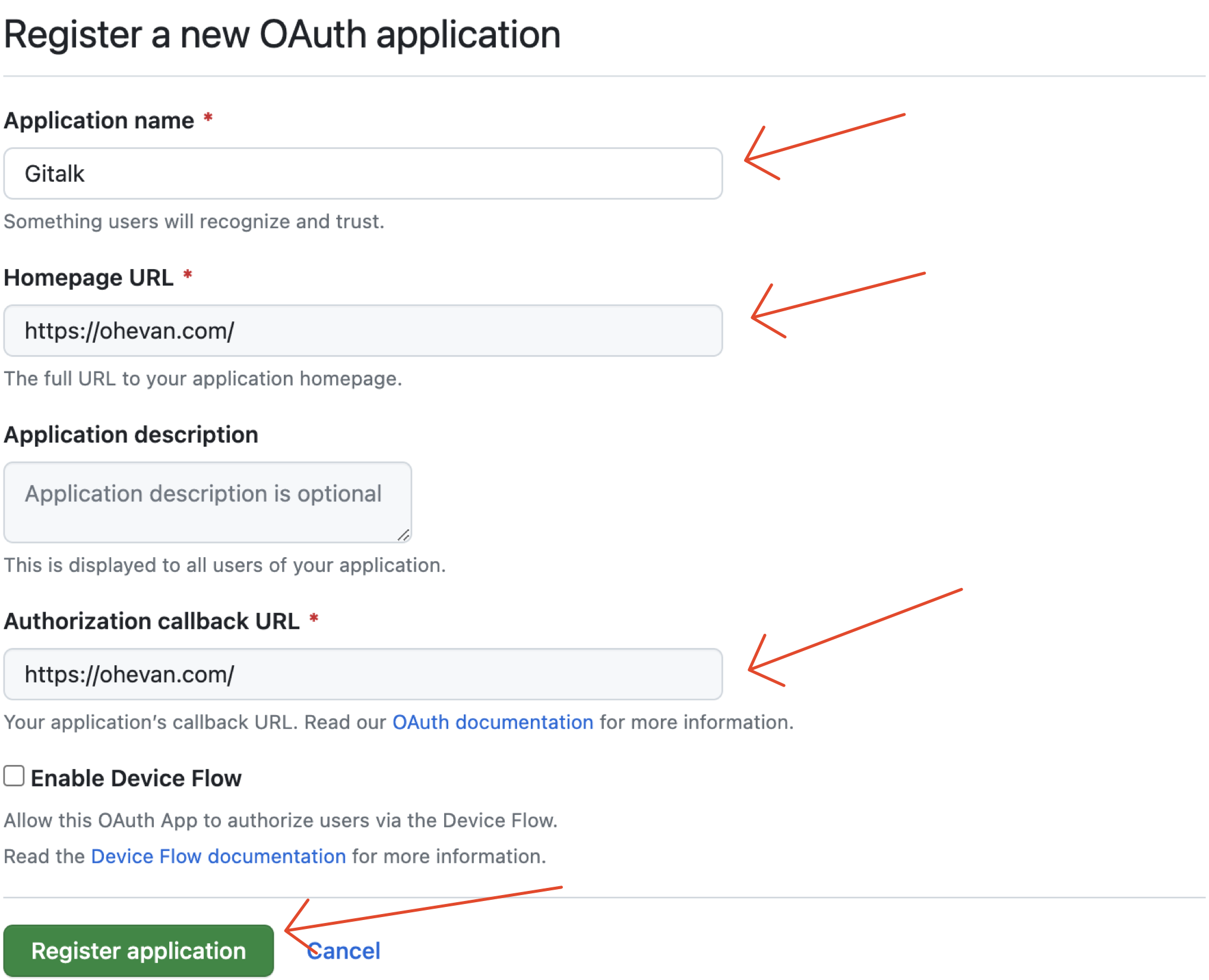
Register or log in to GitHub, create a new OAuth App, and fill in the Homepage URL and Authorization callback URL with your own blog's domain.
After successfully creating the OAuth App, save the Client ID and Client Secret, which will be used below. Note that the Homepage URL and Authorization Callback URL should end with /.
Create a GitHub Repository
Go back to GitHub, create a new repository to store Gitalk comments, and open Issues. Manually add an Issue with any content.
Fill in the Configuration
Fill in your GitHub username, repository name, Client ID of the OAuth App, and Client Secret in the theme configuration file.
comment:
  config:
    gitalk:
      clientID: 你的 Client ID
      clientSecret: 你的 Client Secret
      repo: 你的仓库名
      owner: 你的 GitHub 用户名
Example:
comment:
  config:
    gitalk:
      clientID: 1234567890abcdef1234
      clientSecret: 1234567890abcdef1234567890abcdef12345678
      repo: gitalk
      owner: EvanNotFound
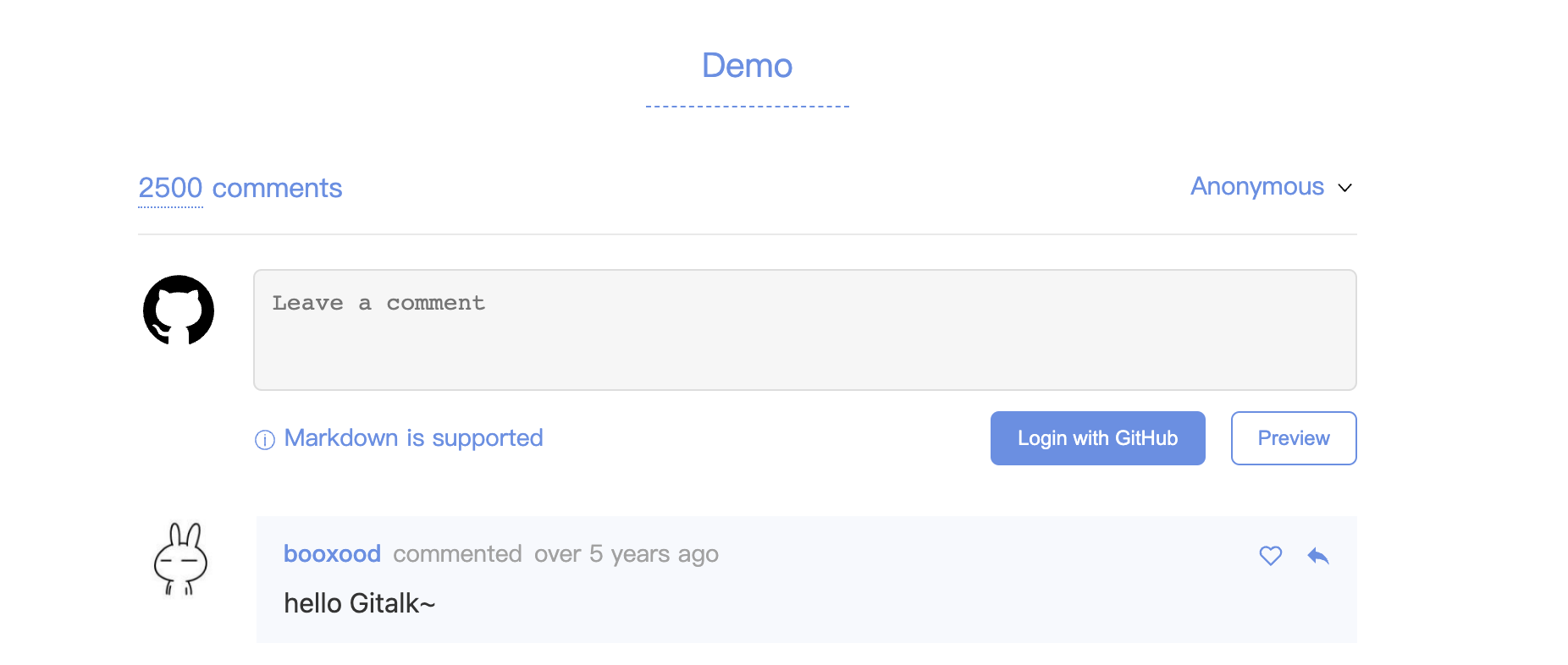
Result
Twikoo Configuration
For more information about the Twikoo commenting system, please visit the Twikoo official website.
Configuration item name: comment.config.twikoo
Server-side
Please visit the Twikoo official website #Quick Start and follow the instructions to configure the Twikoo server-side. (It is recommended to use the Vercel deployment method)
Client-side
After obtaining the server_url you need, fill it in the _config.redefine.yml file.
Note that the region field only needs to be filled in when using Tencent Cloud Functions, and can be left blank in other cases.
comment:
  config:
    twikoo:
      server_url: https://example.example.com #你的 server_url
      region: #你的 region(可选)
Giscus Configuration
For more information about the Giscus commenting system, please visit the Giscus official website.
Configuration item name: comment.config.giscus
Please configure it according to the instructions on the Giscus official website, and fill it in the theme configuration file.
Example configuration:
comment:
  system: giscus
  config:
    ...
    giscus:
      repo: Ching367436/ching367436.github.io # Github repository name
      repo_id: R_kgDOJAMXOw # Github repository id
      category: Announcements # Github discussion category
      category_id: DIC_kwDOJNMYO84CVdDe # Github discussion category id
      mapping: title
      strict: 0
      reactions_enabled: 1
      emit_metadata: 0
      lang: en
      input_position: bottom
      loading: not-lazy
Utterances Configuration
For more information about the Utterances commenting system, please visit the Utterances official website.
Configuration item name: comment.config.utterances
Bind a GitHub Repository
Prepare a GitHub repository with Issues enabled, then authorize it on the Utterances official website.
Fill in the Configuration
comment:
  system: utterances
  config:
    utterances:
      repo: owner/repo # GitHub repository name
      issue_term: pathname # pathname, url, title, og:title
      issue_number: # Use a specific issue instead of issue_term (optional)
      label: # Add a label to created issues (optional)
      theme_light: github-light # Light theme
theme_dark: github-dark # Dark themerepois required and the repository must have Issues enabled.issue_termdefaults topathname, recommended for single-page mode.- Setting
issue_numberwill overrideissue_term. theme_lightandtheme_darkautomatically follow the site light/dark mode.
Last updated on