 Redefine Docs
Article Style (articles)
Font Size
Configuration Option: articles.style.font_size
| Type | Note | Possible Values | Default Value |
|---|---|---|---|
| String | Not recommended to change unless necessary | "*px" | "16px" |
Line Height
Configuration Option: articles.style.line_height
| Type | Note | Possible Values | Default Value |
|---|---|---|---|
| Number | Not recommended to change unless necessary | 1-5 | 1.5 |
Image Border Radius
Configuration Option: articles.style.image_border_radius
| Type | Possible Values | Default Value |
|---|---|---|
| String | "*px" | "14px" |
Image Alignment
Configuration Option: articles.style.image_alignment
| Type | Possible Values | Default Value |
|---|---|---|
| String | left | center | center |
Image Caption
When enabled, the image description will be displayed below the image based on the alt attribute.
Configuration Option: articles.style.image_caption
| Type | Possible Values | Default Value |
|---|---|---|
| Boolean | true | false | true |
Link Icon
Whether to display an icon after the links in the article.

Configuration Option: articles.style.link_icon
| Type | Possible Values | Default Value |
|---|---|---|
| Boolean | true | false | true |
Delete Mask
Enable the black mask effect. When enabled, strikethrough text will have an additional black mask effect.
- Before hover:

- On hover:
Configuration Option: articles.style.delete_mask
| Type | Possible Values | Default Value |
|---|---|---|
| Boolean | true | false | false |
Word Count
Requires installation of the hexo-wordcount plugin.
Please execute the following command to install:
npm install hexo-wordcountSwitch
Configuration Option: articles.word_count.enable
| Type | Possible Values | Default Value |
|---|---|---|
| Boolean | true | false | true |
Count
Configuration Option: articles.word_count.count

Whether to enable word count.
| Type | Possible Values | Default Value |
|---|---|---|
| Boolean | true | false | true |
Reading Time
Configuration Option: articles.word_count.min2read

Whether to enable reading time calculation.
| Type | Possible Values | Default Value |
|---|---|---|
| Boolean | true | false | true |
Author Label

Switch
Configuration Option: articles.author_label.enable
| Type | Possible Values | Default Value |
|---|---|---|
| Boolean | true | false | true |
Automatic Label
Configuration Option: articles.author_label.auto
Automatically adds labels such as Lv1, Lv2, Lv3.
| Type | Possible Values | Default Value |
|---|---|---|
| Boolean | true | false | false |
Custom Tags
Configuration Item: articles.author_label.list
List of custom tags.
| Type | Note | Example |
|---|---|---|
| Array | Please separate with commas | ["Lv1", "Lv2", "Lv3"] |
Code Blocks
Copy Button
Configuration Item: articles.code_block.copy
Whether to enable the copy button for code blocks.
| Type | Possible Values | Default Value |
|---|---|---|
| Boolean | true | false | true |
Custom Themes
Customize the code highlighting theme. Preview can be accessed at highlightjs official website demo. Currently supported:
- Light themes: github, atom-one-light, default
- Dark themes: github-dark, monokai-sublime, vs2015, night-owl, atom-one-dark, nord, tokyo-night-dark, a11y-dark, agate
Light
Configuration item: articles.code_blockhighlight_theme.light
| Type | Optional values | Default value |
|---|---|---|
| String | github | atom-one-light | default | github |
Dark
Configuration item: articles.code_blockhighlight_theme.dark
| Type | Optional values | Default value |
|---|---|---|
| String | github-dark | monokai-sublime | vs2015 | night-owl | atom-one-dark | nord | tokyo-night-dark | a11y-dark | agate | vs2015 |
Style
Configuration Item: articles.code_block.style
| Type | Possible Values | Default Value |
|---|---|---|
| String | mac | simple | mac |
mac style:

simple style:

Font
Configuration Item: articles.code_block.font
enable: Whether to enable custom font.family: Font name.url: URL to the font CSS style file, such as Google Fonts'https://fonts.googleapis.com/css2?family=Source+Code+Pro:wght@400;500;600;700&display=swap.
Table of Contents
Toggle
Configuration Item: articles.toc.enable
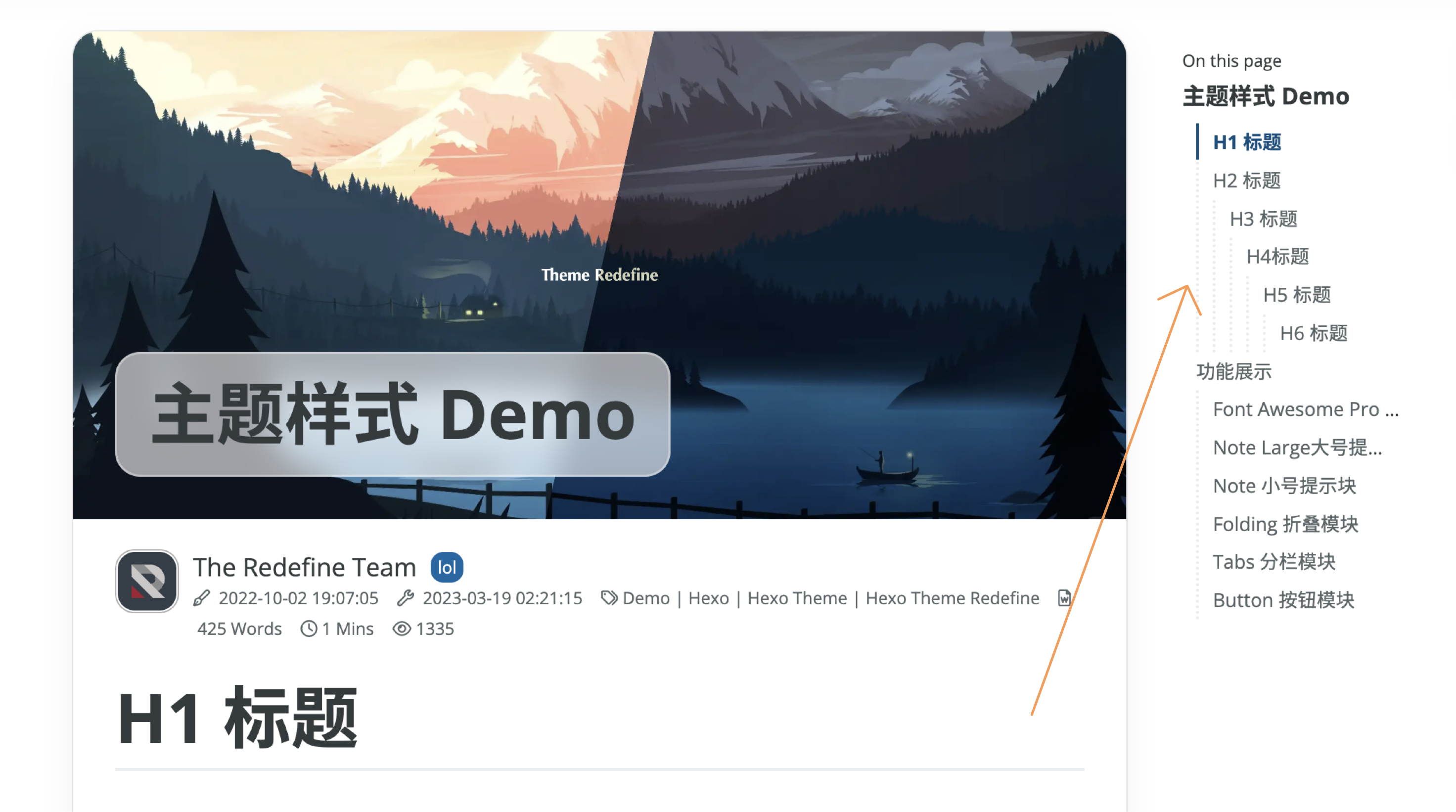
Whether to enable the table of contents.
| Type | Possible Values | Default Value |
|---|---|---|
| Boolean | true | false | true |
Maximum Depth
Configuration Item: articles.toc.max_depth
Set the maximum depth of the table of contents.
| Type | Possible Values | Default Value |
|---|---|---|
| Number | 1-6 | 3 |
Numbering
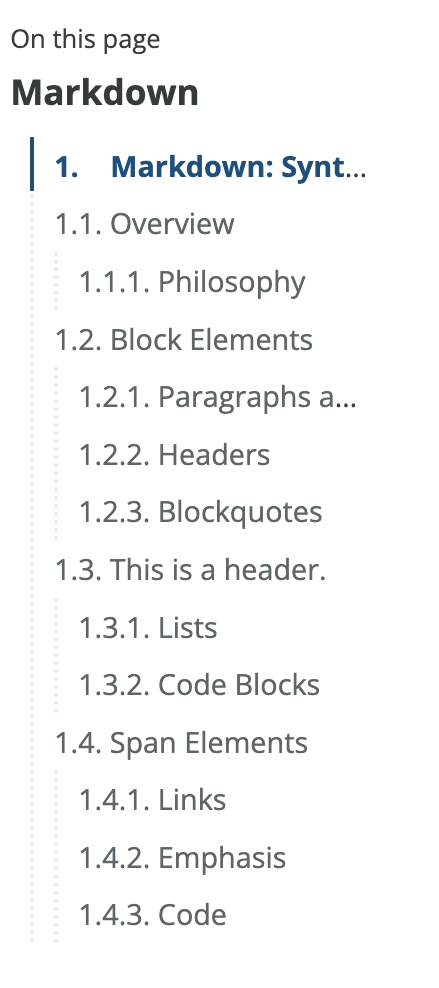
Configuration Item: articles.toc.number
Whether to enable numbering for the table of contents.
Expand All
Configuration Item: articles.toc.expand
Whether to expand all sections of the table of contents.
| Type | Possible Values | Default Value |
|---|---|---|
| Boolean | true | false | true |
Default Open TOC
Configuration Item: articles.toc.init_open
Whether to default open the table of contents.
| Type | Possible Values | Default Value |
|---|---|---|
| Boolean | true | false | true |
Article Copyright
Toggle
Configuration Name: articles.copyright.enable
Whether to display copyright information at the end of the article.
| Type | Options | Default |
| :-----: | :-----: | :-----: | ------ |
| Boolean | true | false | true |

Default Copyright Information
Configuration Item: articles.copyright.default
Options:
all_rights_reserved: All rights reserved.cc_by_nc_sa: Attribution-NonCommercial-ShareAlike, see details at CC BY-NC-SA 4.0.cc_by_nc: Attribution-NonCommercial, see details at CC BY-NC 4.0.cc_by_nd: Attribution-NoDerivatives, see details at CC BY-ND 4.0.cc_by_sa: Attribution-ShareAlike, see details at CC BY-SA 4.0.cc_by: Attribution, see details at CC BY 4.0.public_domain: Public Domain, see details at CC0 1.0.
Custom Copyright Information
To customize the copyright information used in an article, add the license field in the article's Front-matter, for example:
---
title: Hello World
date: 2021-03-22 19:20:00
license: all_rights_reserved
---
Refer to the above explanation for options.
Note that if your article's Front-matter contains a license field, this value will override the default.
If the above options do not meet your needs, you can use copyright in the theme configuration file to customize explanatory information, like:
---
title: Hello World
date: 2021-03-22 19:20:00
copyright: This article is written nonsensically. If you choose to use it, you do so at your own risk.
---
Note that the copyright item has a higher priority than license. So if you write both, only copyright will be effective.
Lazy Load
Configuration Item: articles.lazyload
Whether to enable lazy loading for images. Especially effective for blogs with many images, it can speed up page loading.
| Type | Possible Values | Default Value |
|---|---|---|
| Boolean | true | false | true |
Article Recommendation
Automatically recommend related articles based on article keywords.
You need to install the nodejieba module. Migrated from hexo-theme-volantis.
Please execute the following command to install:
npm install nodejieba@latestSwitch
Configuration item name: articles.recommendation.enable
Enable or disable article recommendation.
| Type | Possible Values | Default |
|---|---|---|
| Boolean | true | false | false |
Title
Configuration item name: articles.recommendation.title
The title of the article recommendation section.
| Type | Note | Default |
|---|---|---|
| String | None | Recommended Articles |
Number of Recommendations
Configuration item names: articles.recommendation.limit and articles.recommendation.mobile_limit
limit refers to the number of recommended articles on desktop, while mobile_limit refers to the number of recommended articles on mobile.
| Type | Possible Values | Default |
|---|---|---|
| Number | 1-10 | 3 |
Excluded Directories
Configuration item name: articles.recommendation.skip_dirs
Directories to exclude when recommending articles.
| Type | Note | Example |
|---|---|---|
| Array | Please separate with commas | ["/docs/", "/private/"] |
Last updated on