 Redefine Docs
评论系统 (comment)
Redefine 主题支持 `waline` `twikoo` `gitalk` `giscus` `utterances` 五种评论系统,你可以根据自己的喜好选择一种。
如果你想对文章单独关闭评论,请在文章的 front-matter 中加入 comment: false。
如果你想对页面单独开启评论,请在页面的 front-matter 中加入 comment: true。
Redefine v2.9.0 版本开始支持 Utterances 评论系统。
全局开关
配置项名称:comment.enable
是否启用评论。
| 类型 | 可选值 | 默认值 |
|---|---|---|
| 布尔值 | true | false | true |
评论系统选择
配置项名称:comment.system
| 类型 | 可选值 | 默认值 |
|---|---|---|
| 字符串 | waline | gitalk | twikoo | giscus | utterances | waline |
Waline 配置
配置项名称:comment.config.waline
服务端
请访问 Waline 官网 #快速开始,按照官网的指引配置好 Waline 服务端.
vercel.app 默认域名在中国大陆地区被墙,所以建议在 Vercel 上面绑定自定义域名。如果暂时没有自定义域名的,可以邮件联系我或者加我微信 do-not-go-plzzz,我有多余的域名可以给你解析用。
客户端
拿到你需要的 serverUrl (即 vercel 应用的链接,可以绑定自定义域名)后,填写到 _config.redefine.yml 中。
comment:
  config:
    waline:
      serverUrl: https://example.example.com #你拿到的 serverUrl
更多关于 Waline 评论系统的信息,请访问 Waline 官网。
Gitalk 配置
更多关于 Gitalk 评论系统的信息,请访问 Gitalk 官网
配置项名称:comment.config.gitalk
获取 GitHub OAuth App
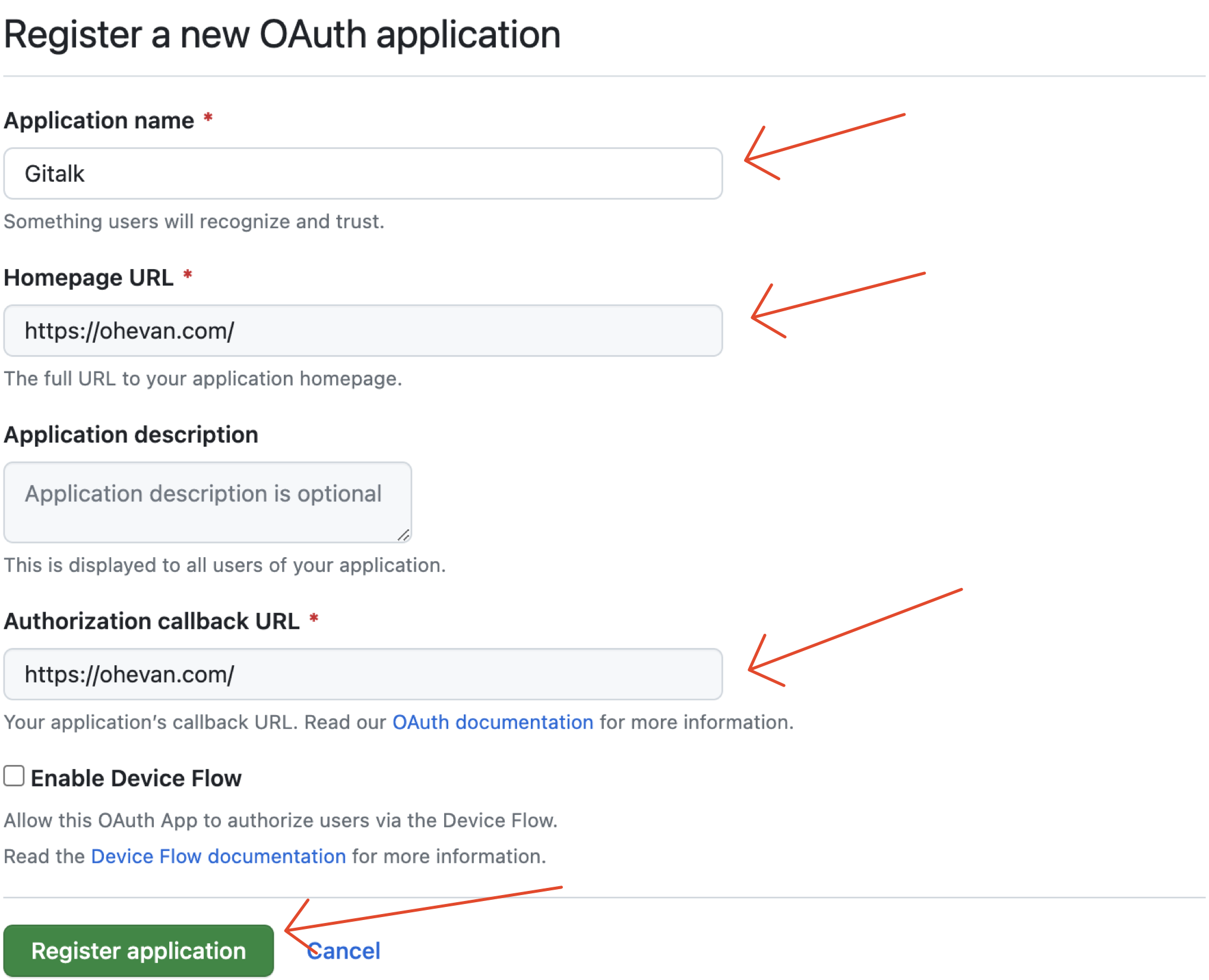
注册或登录 GitHub,创建一个新的 OAuth App,其中 Homepage URL 和 Authorization callback URL 均填写自己博客的域名即可。
OAuth App 创建成功后,把 Client ID 和 Client Secret 保存起来,下面要用到。注意 Homepage URL 和 Authorization Callback URL 结尾要加 /
新建 GitHub 仓库
回到 GitHub,创建一个新的仓库(repository) 用来存放 Gitalk 评论,并打开 Issues,手动增加一个 Issue,内容随便填写即可
填写配置
把自己的 GitHub 用户名、仓库名 、OAuth App 的 Client ID 、Client Secret 分别填写在主题配置文件里。
comment:
  config:
    gitalk:
      clientID: 你的 Client ID
      clientSecret: 你的 Client Secret
      repo: 你的仓库名
      owner: 你的 GitHub 用户名
示例:
comment:
  config:
    gitalk:
      clientID: 1234567890abcdef1234
      clientSecret: 1234567890abcdef1234567890abcdef12345678
      repo: gitalk
      owner: EvanNotFound
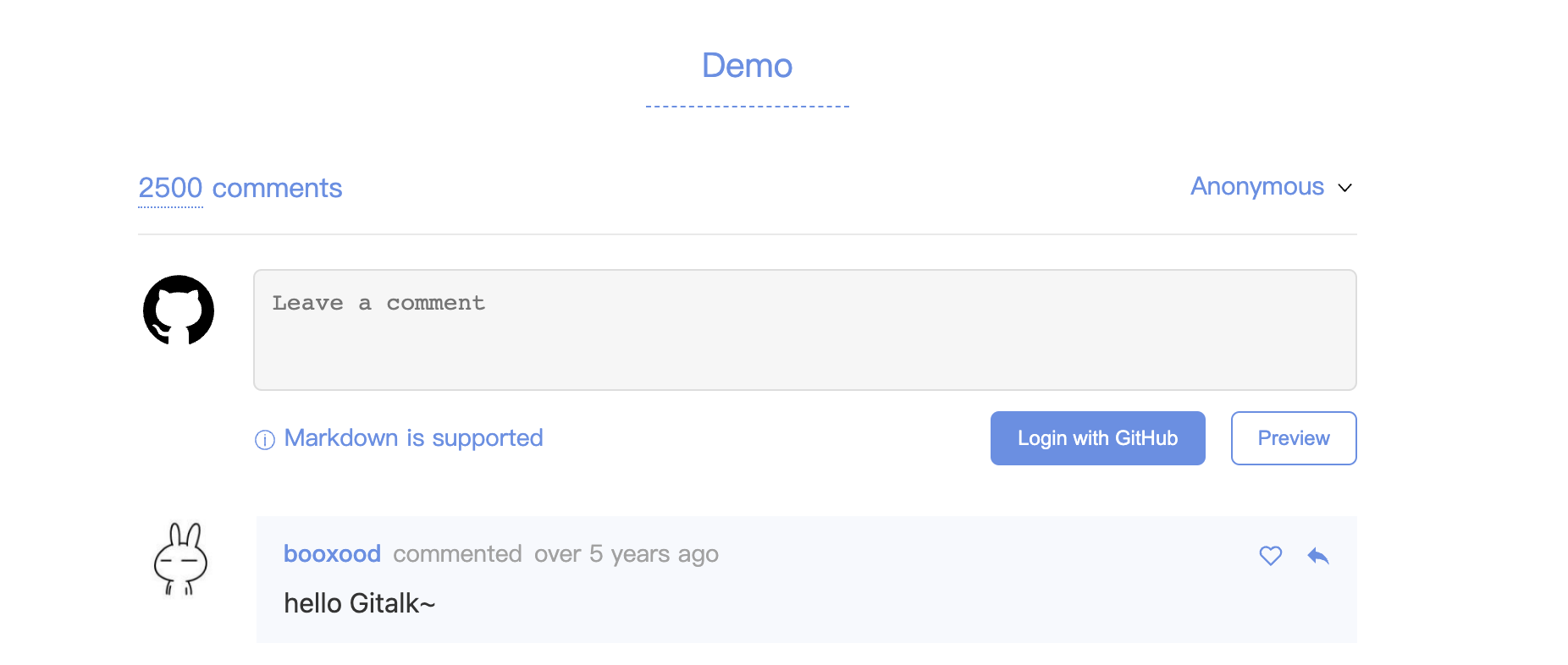
效果
Twikoo 配置
更多关于 Twikoo 评论系统的信息,请访问 Twikoo 官网。
配置项名称:comment.config.twikoo
服务端
请访问 Twikoo 官网 #快速上手,按照官网的指引配置好 Twikoo 服务端。(推荐使用 Vercel 部署方式)
客户端
拿到你需要的 server_url 后,填写到 _config.redefine.yml 中。
其中,region 仅在使用腾讯云函数时需要填写,其他情况下可以不填。
comment:
  config:
    twikoo:
      server_url: https://example.example.com #你的 server_url
      region: #你的 region(可选)
Giscus 配置
更多关于 Giscus 评论系统的信息,请访问 Giscus 官网。
配置项名称:comment.config.giscus
请根据 Giscus 官网中进行配置,并在主题配置文件中填写。
示例配置:
comment:
  system: giscus
  config:
    ...
    giscus:
      repo: Ching367436/ching367436.github.io # Github repository name
      repo_id: R_kgDOJAMXOw # Github repository id
      category: Announcements # Github discussion category
      category_id: DIC_kwDOJNMYO84CVdDe # Github discussion category id
      mapping: title
      strict: 0
      reactions_enabled: 1
      emit_metadata: 0
      lang: en
      input_position: bottom
      loading: not-lazy
Utterances 配置
更多关于 Utterances 评论系统的信息,请访问 Utterances 官网。
配置项名称:comment.config.utterances
绑定 GitHub 仓库
准备一个开启了 Issues 的 GitHub 仓库,并在 Utterances 官网 按指引授权该仓库。
填写配置
comment:
  system: utterances
  config:
    utterances:
      repo: owner/repo # GitHub 仓库名
      issue_term: pathname # pathname, url, title, og:title
      issue_number: # 使用指定 Issue 替代 issue_term(可选)
      label: # 给创建的 Issue 添加标签(可选)
      theme_light: github-light # 亮色主题
theme_dark: github-dark # 暗色主题repo为必填,且仓库必须开启 Issues。issue_term默认是pathname,单页模式推荐使用该值。- 配置
issue_number后会忽略issue_term。 theme_light与theme_dark会跟随主题明暗模式自动切换。
Last updated on